
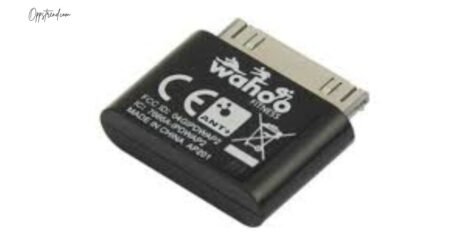
If you’re a fitness enthusiast, cyclist, or runner who loves tracking your performance, chances are you’ve heard of the Wahoo Fisica Key. Though it may look like a small piece of tech, this tiny device was a game-changer when it came to connecting fitness sensors with smartphones. Whether you’re using heart rate monitors, cadence sensors, or speed trackers, the Wahoo Fisica Key bridges the gap between your gear and your favorite fitness apps.
In this complete guide, we’ll walk you through everything you need to know about the Wahoo Fisica Key—what it is, how it works, how to set it up, and how to get the most out of it.
What Is the Wahoo Fisica Key?
The Wahoo Fisica Key is an ANT+ receiver designed primarily for Apple devices with a 30-pin dock connector (like the older iPhone, iPod Touch, and iPad models). ANT+ is a wireless protocol used by many fitness devices—such as heart rate straps, foot pods, cycling sensors, and power meters—to transmit data.
Before Bluetooth became the standard for fitness connectivity, the Wahoo Fisica Key was the go-to accessory for athletes. It allowed users to receive live data from ANT+ sensors directly on their iPhones through apps like Wahoo Fitness, Strava, or Garmin Connect.
In short: it turns your iPhone into a smart fitness computer.
Key Features
-
ANT+ Connectivity: Seamlessly connects to a wide range of sensors such as speed, cadence, and heart rate monitors.
-
Compact Design: Small, lightweight, and easy to carry during workouts.
-
Plug-and-Play Functionality: Just connect it to your device, and compatible apps recognize it instantly.
-
Low Power Consumption: Uses very little power from your iPhone’s battery.
-
Reliable Data Transmission: Provides accurate, real-time workout metrics without lag or dropouts.
Compatibility
Originally, the Wahoo Fisica Key was made for devices with the 30-pin connector, such as:
-
iPhone 3G / 3GS / 4 / 4S
-
iPod Touch (2nd – 4th generation)
-
iPad (1st and 2nd generation)
However, if you want to use it with newer devices that have a Lightning port, you can still do it using the official Apple 30-pin to Lightning adapter. Some users also report success using third-party adapters, but official Apple ones are recommended for stability and performance.
How the Wahoo Fisica Key Works
The concept is simple yet smart. ANT+ sensors—like those on your bike or heart rate strap—send out small wireless signals containing data about your activity. The Wahoo Fisica Key receives these signals and passes them on to your phone through the connector. Once inside your app, that data is displayed in real time as speed, distance, heart rate, or power output.
This setup allowed early adopters to have a complete fitness ecosystem long before Bluetooth Smart sensors became widespread.
Step-by-Step Setup Guide
Setting up your Wahoo Fisica Key is quick and easy. Follow these steps:
Step 1: Connect the Wahoo Fisica Key
Plug the key into your iPhone or iPad’s connector port. If your device uses a Lightning port, use a 30-pin adapter.
Step 2: Install a Compatible App
Download a compatible app that supports ANT+ sensors. Some popular options include:
-
Wahoo Fitness App (official)
-
Cyclemeter
-
Runmeter
-
Strava (legacy versions)
-
TrainerRoad (for indoor training)
Open the app, and it should automatically detect the Wahoo Fisica Key.
Step 3: Pair Your Sensors
Turn on your ANT+ sensor (heart rate strap, speed/cadence sensor, etc.). Go into your app’s settings, find the “Sensors” or “Connections” section, and start scanning for devices. Your sensor should appear in the list—tap to connect.
Step 4: Start Your Workout
Once paired, you’ll start seeing real-time stats such as:
-
Heart rate (BPM)
-
Speed (km/h or mph)
-
Cadence (RPM)
-
Distance and power output (if using a power meter)
Step 5: Save and Analyze Your Data
After your workout, you can save your data in the app or upload it to online platforms like Strava, TrainingPeaks, or Garmin Connect for long-term tracking.
Troubleshooting Tips
If your Wahoo Fisica Key isn’t working, here are some quick fixes:
-
Check Compatibility: Make sure you’re using a supported iOS version or adapter.
-
Restart the App: Sometimes a quick restart will help it detect the key again.
-
Battery Check (Sensors): Your ANT+ sensors might have dead batteries. Replace them if they’re not transmitting.
-
Re-Pair Sensors: Delete and re-add sensors from your app’s settings.
-
Use Official Apps: Start with the official Wahoo Fitness app to confirm the key is functional.
Advantages of Using Wahoo Fisica Key
Even though it’s an older accessory, the Wahoo Fisica Key still has value today for athletes who:
-
Use legacy ANT+ sensors that don’t support Bluetooth.
-
Want a stable and accurate connection during workouts.
-
Train using older Apple devices.
-
Prefer a wired-like reliability without the occasional interference that can occur with Bluetooth.
Many indoor cycling setups and triathlon coaches still rely on this little key for consistent data logging.
Alternatives to the Wahoo Fisica Key
If you can’t find the Fisica Key anymore (it’s discontinued but available through resellers), here are modern alternatives:
-
Wahoo Fitness ANT+ to Bluetooth Adapter
-
Garmin USB ANT+ Stick (for computers)
-
4iiii Viiiiva Heart Rate Monitor (acts as a bridge between ANT+ and Bluetooth)
These newer options let you connect your old sensors to newer phones and computers without needing the 30-pin key.
Conclusion
The Wahoo Fisica Key might belong to an earlier generation of fitness tech, but it remains a clever, reliable, and useful device for athletes who still value ANT+ connectivity. Whether you’re a cyclist training indoors, a runner analyzing cadence data, or a coach tracking athlete performance, this little key can still deliver solid performance when used correctly.
With the right setup and compatible apps, the Wahoo Fisica Key continues to prove that even small gadgets can make a big difference in how we track and understand our fitness.